# Launching Solveit, the antidote to AI fatigue
Johno Whitaker
2025-10-02
> **tldr from Jeremy:** “How to Solve it With Code” is a course from
> fast.ai in iterative problem solving, and [a platform
> (‘Solveit’)](https://youtu.be/bxDDLMe6KuU) to make that easier. The
> course shows how to use AI in small doses to help learn as you build,
> but doesn’t rely on AI. The approach is based on decades of research
> and practice from Eric Ries and I. It’s basically the opposite of
> “vibe coding”; it’s all about small steps, deep understanding, and
> deep reflection. We wrote the platform because we didn’t find anything
> else sufficient for doing work the “solveit way”, so we made something
> for ourselves, and then decided to make it available more widely. You
> can follow the approach without using our platform, although it won’t
> be as smooth an experience.
It’s a strange time to be a programmer. It’s easier than ever to get
started, but also easier than ever to let AI steer you into a situation
where you’re overwhelmed by code you don’t understand. We’ve got an
antidote that we’ve been using ourselves with 1000 preview users for the
last year. It’s changed our lives at Answer.AI, and [hundreds of our
users](https://solve.it.com/testimonials) say the same thing. Now we’re
ready to share it with you. [Signups are open](https://solve.it.com),
and will remain so until October 20th. Over five weeks, we’ll give you a
taste of how our new approach and platform, “Solveit”, can be applied to
everything from programming challenges, web development, and system
administration to learning, writing, business, and more.
OK, let’s explain what on earth we’re talking about!…
At the end of last year, Jeremy Howard (co-founder of fast.ai,
Answer.AI, Kaggle, Fastmail, creator of the first LLM…) and I ran a
small trial course titled “How To Solve It With Code”. The response was
so overwhelming that we had to close signups after just one day. 1000
keen beans joined us for a deep dive into our general approach to
solving problems. The first few lessons were taught via the vehicle of
the ‘Advent of Code’ programming challenges and run in a new,
purpose-built tool called **solveit**. As the course progressed, we had
lots of fun exploring web development, AI, business, writing and more.
And the solveit tool became an extremely useful test-bed for ideas
around AI-assisted coding, learning and exploration.
In the year since, we’ve continued to refine and expand both the process
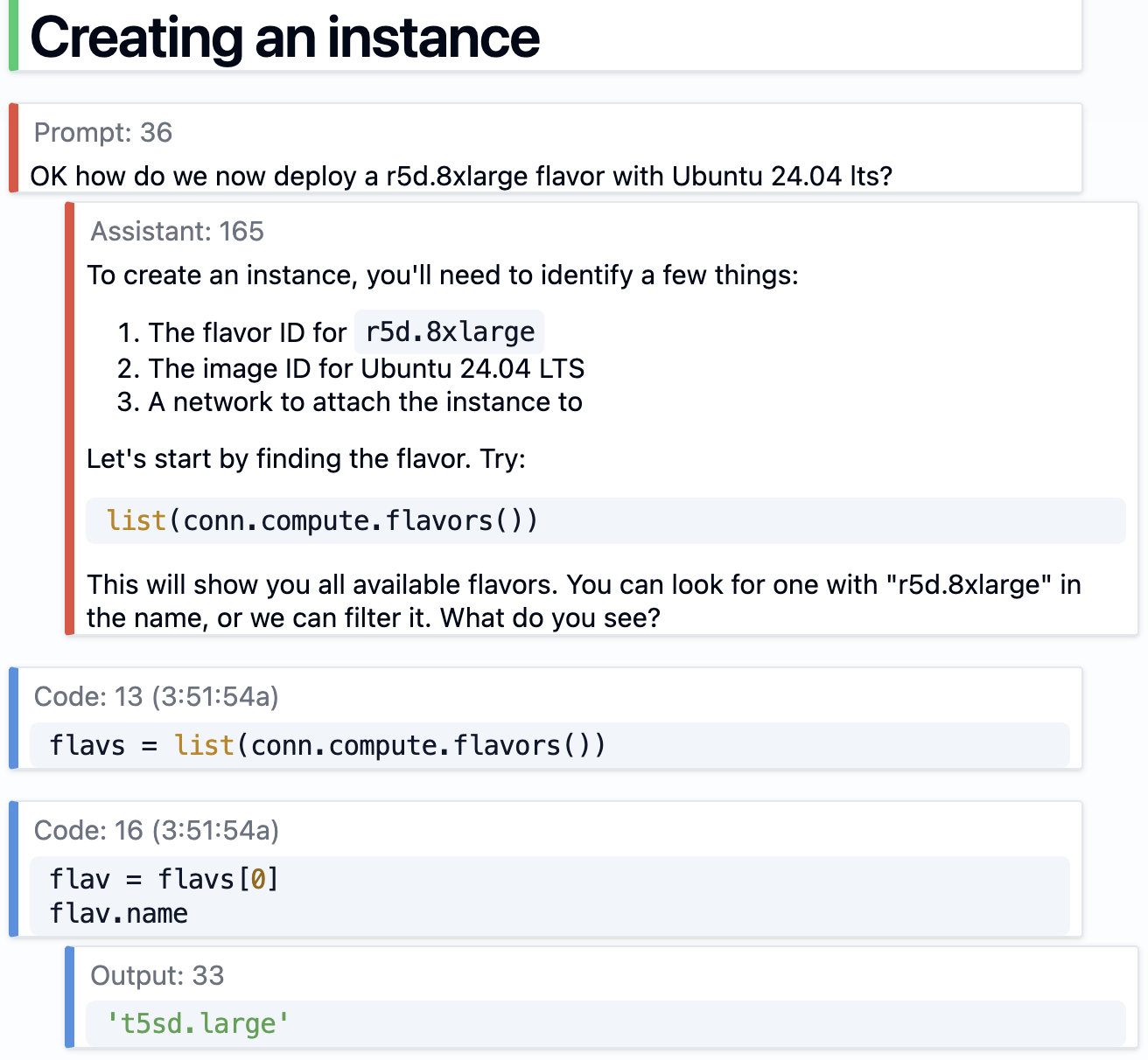
and the platform. We now basically live in the solveit platform. We do
all our sysadmin work in it (Solveit itself is hosted on a new
horizontally scalable multi-server platform we built and run entirely
using Solveit!), host production apps in it (e.g all students in the
course can use a Discord AI bot “Discord Buddy” that’s running inside a
Solveit dialog!), develop most of our software in it, our legal team
does contract drafting in it, we iterate on GUIs in it, and in fact we
do the vast majority of our day to day work of all kinds in it.
Real example of Jeremy and I using
Solveit to setup a server farm for deploying Solveit
From October 20th for five weeks, Jeremy and I will show you how to use
the solveit approach, and give you full access to the platform that
powers it (and you’ll have the option to continute to access the lessons
and platform afterwards too). Also [Eric
Ries](https://en.wikipedia.org/wiki/Eric_Ries) will join us for lessons
about building startups that don’t just make money, but that stick to
your vision for how you want to impact the world. You’ll be amongst the
first people in the world to have the opportunity to read his new
unreleased book.
But what IS “the solveit approach”? It isn’t some new AI thing, but
actually is based on ideas that are at least 80 years old… To learn
more, read on, or watch this video Jeremy and I recorded a few weeks
ago.
## Inspiration from Polya
George Polya was a Hungarian mathematician who wrote the influential
book “How to Solve It” in 1945. In it, he shares his philosophies on
education (focus on active learning, heuristic thinking, and careful
questioning to guide students towards discovering answers for
themselves) and outlines a four-step problem-solving framework:
1. Understand the Problem: identify what you’re being asked to do;
restate the problem
2. Devise a Plan: draw on similar problems; break down into manageable
parts; consider working backward; simplify the problem
3. Carry Out the Plan: verify each step
4. Look Back and Reflect: consider alternatives; extract lessons
learned
He was focused on mathematics, but as Jeremy and I realized, these ideas
translate far beyond maths! It turns out that it actually works great
for coding, writing, reading, learning…
Of course, you can often just have AI code and write for you. But
*should* you?
In most cases, we argue the answer is “no”.
There’s a myriad of problems waiting for you if you go down that path: -
If you didn’t know the foundations of how to do it before, you don’t now
either. You’ve learned nothing - If you keep working this way, you build
up more and more code you don’t understand, creating technical and
understanding debt that will eventually become crippling - You won’t be
building up a foundation to solve harder tasks that neither humans nor
AI can one-shot. So you’re limiting yourself to only solving problems
that everyone else can trivially solve too. This is not a recipe for
personal or organizational success!
On the other hand, if you build a discipline of always working to
improve your understanding and expertise, you’ll discover that something
delightful and amazing happens. Each time you tackle a task, you’ll find
it’s a little easier than the last one. These improvements in
understanding and capability will multiply, and you’ll find that your
own skills develop even faster than AI improves. You’ll focus on using
AI to help you dramatically increase your own productivity and
abilities, instead of focusing on helping the AI improve its
productivity and abilities!
## Application to Coding: iterative, exploratory coding in notebook-like environments.
Let’s consider a quick example of coding the solveit way (without even
any AI yet). For 2024’s Advent of Code, Day 1’s solution involves
comparing two lists, sorted by value (there’s a whole backstory
involving elves, which you can [read if you
like](https://adventofcode.com/2024/day/1)). Let’s imagine we’ve
considered the problem, and are now focused on a small sub-task:
extracting the first (sorted) list. We start with the sample data
provided:
``` python
x = '3 4\n4 3\n2 5\n1 3\n3 9\n3 3'
```
Our plan might be:
- Split into a list of lines
- Grab the first number from each line
- Sort
After thinking through the plan, we begin working on individual steps.
We aim to write no more than a few lines of code at a time, with each
piece giving some useful output that you can use to **verify** that
you’re on the right track:
``` python
lines = x.splitlines()
lines
>>> ['3 4', '4 3', '2 5', '1 3', '3 9', '3 3']
```
Now we build up a list comprehension to get the first elements. We might
start with `[o for o in lines]` and then add bits one at a time,
inspecting the output, building up to:
``` python
l1 = [int(o.split()[0]) for o in lines]
l1
>>> [3, 4, 2, 1, 3, 3]
```
Now sorting:
``` python
sorted(l1)
>>> [1, 2, 3, 3, 3, 4]
```
Now that we’ve run all the pieces individually, and checked that the
outputs are what we’d expect, we can stack them together into a
function:
``` python
def get_list(x):
lines = x.splitlines()
l1 = [int(o.split()[0]) for o in lines]
return sorted(l1)
get_list(x)
>>> [1, 2, 3, 3, 3, 4]
```
At this point, you’d reflect on the solution, think back to the larger
plan, perhaps ask yourself if there are better ways you could do it. You
may be thinking that this is far too much work for
`sorted(int(line.split()[0]) for line in x.splitlines())` – as your
skill increases you can tailor the level of granularity, but the idea
remains the same: working on small pieces of code, checking the outputs,
only combining them into larger functions once you’ve tried them
individually, and constantly reflecting back on the larger goal.
(We’ll come back to this shortly – but also consider for a moment how
integrated AI can fit into the above process. Any time you don’t know
how to do something, you can ask for help with just that one little
step. Any time you don’t understand how something works, or why it
doesn’t, you can have AI help you with that exact piece.)
## The Power of Fast Feedback Loops
The superpower that this kind of live, iterative coding gives you is
near-instant feedback loops. Instead of building your giant app, waiting
for the code to upload, clicking through to a website and then checking
a debug console for errors – you’re inspecting the output of a chunk of
code and seeing if it matches what you expected. It’s still possible to
make mistakes and miss edge cases, but it is a LOT easier to catch most
mistakes early when you code in this way.
This idea of setting things up so that you get feedback as soon as
possible pops up again and again. Our cofounder Eric Ries talks about
this in his book ‘The Lean Startup’, where getting feedback from
customers is valuable for quick iteration on product or business ideas.
Kaggle pros talk about the importance of fast evals – if you can test an
idea in 5 minutes, you can try a lot more ideas than you could if each
experiment requires 12 hours of model training.
## AI: Shared Context is Key
So far so good – sounds like we’re describing the style of
exploratory/literate programming taught in the fast.ai course, and used
with tools like NBDev. Aren’t we in a new era though? Where is the AI?!
Well, it turns out that by building code in this way, with planning,
notes and tests mixed in with the source code, you’re also building the
perfect context for an AI to help with the code too. Solveit can see
everything you can see. We’ve discovered that this actually transforms
“AI+Human” capabilities in ways that surprised even us.
It’s become a key foundation of all our work at Answer.AI now: the AI
should be able to see everything exactly as the human does, and vice
versa, and both human and AI must be able to use the same tools. This
makes the AI a true iterative partner to bounce ideas off, try
experiments, and learn together with.
You can also feed additional context to Solveit by referencing specific
variables, or having it use its built-in search and URL-reading tools.
And any python function becomes a tool that you can ask solveit to use,
making it easy to give it everything it needs to fetch more context or
take “agentic” actions to give better responses.
> **Tip**
>
> This idea of having an AI that can see everything that you can see, in
> a shared environment, is put to good use in our beloved [shell
> sage](https://www.answer.ai/posts/2024-12-05-introducing-shell-sage.html)
> tool too!
## AI: Dialog Engineering Keeps Context Useful
One issue with current chat-based models is that once they go off the
rails, it’s hard to get back on track. The model is now modelling a
language sequence that involves the AI making mistakes – and more
mistakes are likely to follow! If you’ve used language models much, then
you’ve no doubt experienced this problem many times.
There is an interesting mathematical reason that this occurs. The vast
majority of language model training is entirely about getting a neural
network to predict the next word in a sentence – they are
*auto-regressive*. Although they are later fine-tuned to do more than
this, they are still at their heart really wanting to predict the next
word of a sentence. In the documents used for training, there are plenty
of examples of poor-quality reasoning and mistakes.Therefore, once an AI
sees some mistakes in a chat, the most likely next tokens are going to
be mistakes as well. That means that every time you are correcting the
AI, you are making it more likely for the AI to give bad responses in
the future!
Because solveit dialogs are fluid and editable, it’s much easier to go
back and edit/remove mistakes, dead ends, and unrelated explorations.
You can even edit past AI responses, to steer it into the kinds of
behaviour you’d prefer. Combine this with the ability to easily hide
messages from the AI or to pin messages to keep them in context even as
the dialog grows beyond the context window and starts to be truncated,
and you have a recipe for continued AI helpfulness as time goes on.
We’ve been talking about this as “dialog engineering” for a [long
time](https://youtu.be/qO-YqJm0Q1U?si=j7JLf0yk_hmOrWzY&t=3689) – and it
really is key to having AI work sessions that **improve** as time goes
on, rather than degrading.
Of course, this is all useful for humans too! The discipline of keeping
things tidy, using (collapsible) headings to organise sections, writing
notes on what you’re doing or aiming for, and even past
questions+answers with the AI all make it a pleasure to pick back up old
work.
## Building an App for Collaboration not Replacement
One thing is still (intentionally) hard in solveit though, and that is
getting the AI to actually write all of your code in a hands-off way.
We’ve made various choices to gently push towards the human remaining in
control. Things like:
- Solveit defaults to code inputs
- AI outputs code in fenced blocks, but these are not added to your code
or run until you choose to do so. There are shortcuts to add them, but
this extra step encourages you to read + refactor before mindlessly
running
- In ‘Learning’ mode especially, the AI will gently guide you to writing
small steps rather than providing a big chunk of code, unless you
really specifically ask it to do so.
- In ‘Learning’ mode, the AI ‘ghost text’ auto-complete suggestions
don’t show unless you trigger them with a keyboard shortcut.
Even the choice to have the editor be fairly small and down at the
bottom emphasizes that this is a REPL/dialog, optimised for building
small, understandable pieces. It’s entirely possible to practice the
solveit approach in other tools, but we’ve also found that a combination
of these intentional choices and the extra affordances for dialog
engineering rapidly feel indispensible.
## Learning Trajectory
This brings us back to a foundational piece of the solveit approach: a
learning mindset. It’s great that we can ask AI to fill in the gaps of
our knowledge, or to save some time with fiddly pieces like matplotlib
plots or library-specific boilerplate. But when the AI suggests
something you don’t know, it is important not to skip it and move on –
otherwise that new piece will never be something you learn!
We try to build the discipline to stop and explore anytime something
like this comes up. Fortunately, it’s really easy to do this – you can
add new messages trying out whatever new thing the AI has shown you,
asking how it works, getting demo code, and poking it until you’re
satisfied. And then the evidence of that side-quest can be collapsed
below a heading (for later ref) or deleted, leaving you back in the main
flow but with a new piece of knowledge in your brain.
Like many programmers, I’ve had my share of existential worries given
the rapid rise in AI’s coding ability. What if AI keeps getting better
and better, to the point where there’s little point for the average
person actually learning to master any of these skills? If you assume
your coding skills stay static, and imagine the AI continuing to get
better, you may feel kinda bleak. The thing is, skill doesn’t have to be
static! And as both you and the AI you’re carefully using get better,
you will learn faster and be able to accomplish more and more.
## Mastery Requires Deliberate Practice
This is all hard work. It’s like exercise, or practicing a musical
instrument. And like any pursuit of mastery, I don’t know that it’s for
everyone. But as we’ve seen from all of the students who invested their
time into the first cohort, the effort is well worth it in the end. Just
take a look at the [project
showcase](https://solveit-project-showcase.pla.sh/) featuring a few
hundred (!) things our community has made.
## Sign up for Solveit
If you’re interested in joining us to learn how to use the Solveit
approach yourself, head over to our site and sign up:
[solve.it.com](https://solve.it.com), Signups are open until October
20th, but may close earlier if we fill up, so don’t wait too long!