# The Stripe Experience You Deserve
Nathan Cooper
2025-07-23
# TL;DR
**tldr:** I got frustrated with the developer experience I was getting
with the [Stripe](https://stripe.com/) SDK and decided to create, in my
opinion, a better one called [FastStripe](https://stripe.fast.ai/).
FastStripe supports the full Stripe API thanks to the awesome OpenAPI
spec that Stripe released, but it makes it cleaner, organizes it better,
and integrates well with your IDE so that you get nice tab completion on
your parameters. You get clean docstrings that explain what the function
does and what each parameter does. We also add helper functions and make
doing things like creating one-time payments be done in 6 lines of code,
whereas with the official SDK, it’s roughly 25. Or setting up a
recurring subscription—FastStripe gets it done in 9 lines of code where
the equivalent in the official SDK is roughly 25 lines.
It is out and about. It has been powering our own internal apps for
almost a month now without any issues, all the while reducing their
complexity. You can start using it by running `pip install faststripe`
and creating your very first one-time payment link:
``` python
from faststripe.core import StripeApi
sapi = StripeApi('your-key-here')
checkout = sapi.one_time_payment(product_name='Digital Course', amount_cents=49_99,
success_url='http://localhost:5001/success',
cancel_url='http://localhost:5001/cancel')
print(checkout.url[:64] + "...")
```
https://billing.answer.ai/c/pay/cs_test_a1gQnoO5ezm5yFB47GZNWO6I...
We also continually update FastStripe for every new version of the
Stripe API.
# The Stripe Experience You Deserve
Stop me if this sounds familiar: You want to take people’s money, and
you want to make sure you can take it super easily. Like candy from a
baby easy. And, yeah, yeah, yeah, of course, you want to, in exchange
for that money, provide some service or product that the person is
willing to exchange their money for. This used to be a nightmare to do
and for some companies; it can still kind of feel like a nightmare
(Cough, cough, Google)
Stripe makes much of this process pretty easy, but by golly, trying to
use their SDK over the last eight months has been a journey, and it’s
been a long one. So long and bumpy that I realized early on that this
just wasn’t going to cut it. Let me show you what I mean. Here’s what
accepting payments typically looks like:
``` python
import stripe
# Step 0: Set up Stripe API key
stripe.api_key = 'your-api-key'
# Step 1: Create a product (hope you remember the parameters)
product = stripe.Product.create(name='Digital Course')
# Step 2: Create a price (what parameters does this take again?)
price = stripe.Price.create(product=product.id, unit_amount=4999, # Wait, is this in cents or dollars?
currency='usd')
# Step 3: Create checkout session (time to hunt through docs)
checkout = stripe.checkout.Session.create(mode='payment', # What other modes are there?
line_items=[{'price': price.id, 'quantity': 1}],
success_url='http://localhost:5001/success',
cancel_url='http://localhost:5001/cancel')
print(checkout.url[:64] + "...")
```
https://billing.answer.ai/c/pay/cs_test_a100gzzSnVxiOBse34iThOdq...
Looks simple enough, right? Well, when you know what the parameters are,
it is. But if I’m some weirdo who doesn’t actually have any of these
memories, I need to go look at the source code to read the docstring and
implementation details. Great, let’s do that! Here’s the actual source
code for creating a checkout session:
``` python
@classmethod
def create(cls, **params: Unpack["Session.CreateParams"]) -> "Session":
"""
Creates a Checkout Session object.
"""
return cast(
"Session",
cls._static_request(
"post",
cls.class_url(),
params=params,
),
)
```
Well shit… I experienced this moment again and again and again when it
came time to integrate payment processing into my apps. The only
solution that I could find was to go to their website and look at the
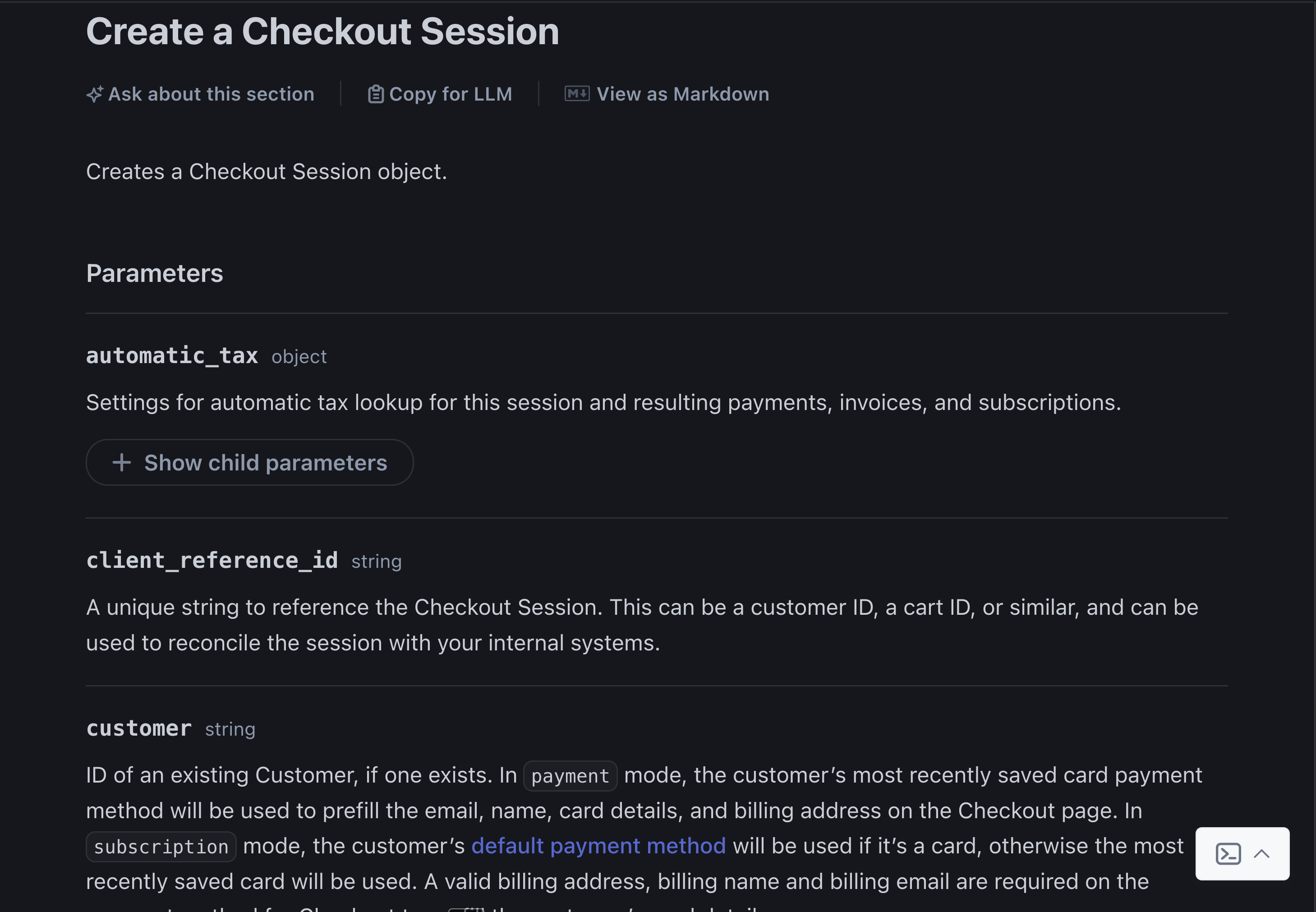
actual API reference docs. Here’s what those docks look like in case
you’re interested:
Docs like that bring a tear to my eye. It’s just so beautiful. Here’s a
[link](https://docs.stripe.com/api/checkout/sessions/create?api-version=2025-06-30.basil)
to it as well if you want to see it for yourself, along with the rest of
the docs, which I highly recommend, as they’re really well written.
However, these trips to the docs caused a lot of context switching,
which is a developer’s worst friend, and it’s also not a great
experience for being able to explore different ways and features that
Stripe offers to developers.
I don’t want my teammates to have to experience this every time they
want to launch an app that takes payments. I don’t want you, the reader,
to have to do this either. It’s not fun. It kills an afternoon when it
should take a few minutes. And so, I decided to implement what one of my
previous colleagues, [Isaac](https://isaacflath.com/), here at Answer
likes to call rage-driven development (RDD) and build
[FastStripe](https://github.com/AnswerDotAI/faststripe/tree/main): the
Stripe experience you deserve.
## FastStripe
Let’s see what it looks like to implement the above in FastStripe:
``` python
from faststripe.core import StripeApi
sapi = StripeApi('your-key-here')
checkout = sapi.one_time_payment(product_name='Digital Course', amount_cents=49_99,
success_url='http://localhost:5001/success',
cancel_url='http://localhost:5001/cancel')
print(checkout.url[:64] + "...")
```
https://billing.answer.ai/c/pay/cs_test_a1u6skiy313rnW2pWwcPhqK5...
A single method call, which under the hood handles creating the product
or finding an existing product, sets up the price and creates your
checkout session with sensible defaults. And if you want more control,
FastStripe gives you access to the full Stripe API, even those esoteric
ones that you’ll probably never use (By the way, did you know that
Stripe has an API specifically for [Climate
products](https://docs.stripe.com/api/climate/order)?! I didn’t until
working on this project and really wish I could fill that part of my
brain with something useful. Alas…). It also adds proper IDE support, so
you have nice tab completion. You also have nice docstrings that explain
each parameter, letting you stay in your happy place for longer:
``` python
def one_time_payment(
self:StripeApi, product_name, amount_cents,
success_url, cancel_url, currency='usd', quantity=1, **kw):
'Create a simple one-time payment checkout'
_, price = self.priced_product(product_name, amount_cents, currency)
return self.checkout.sessions_post(
mode='payment', line_items=[dict(price=price.id, quantity=quantity)],
automatic_tax={'enabled': True}, success_url=success_url, cancel_url=cancel_url, **kw)
```
### Down the Rabbit Hole We Go
Well if you are still here, I’ll assume you took the red pill and are
following me down the rabbit hole of how I built FastStripe. Let’s
begin!
Let’s talk about what made this all possible. Stripe, bless their souls,
went ahead and published a truly beautiful
[OpenAPI](https://swagger.io/specification/) spec for their entire API.
Now, if you’re not familiar, OpenAPI specs are like the blueprint for
how to talk to an API. They describe every endpoint, every parameter,
and even decent human-friendly descriptions for what things do and what
you need to provide. And Stripe’s is *exceptionally* thorough.
What’s even cooler is that these specs are really easily parsed since
they are written in either JSON or YAML. Years back, my CEO [Jeremy
Howard](https://jeremy.fast.ai/) and [Hamel Husain](https://hamel.dev/)
did this to dynamically generate a python SDK for the GitHub API called
[ghapi](https://ghapi.fast.ai/).
> ghapi provides 100% always-updated coverage of the entire GitHub API.
> Because we automatically convert the OpenAPI spec to a Pythonic API,
> ghapi is always up to date with the latest changes to GitHub APIs.
> Furthermore, because this is all done dynamically, the entire package
> is only 35kB in size!
And I thought to myself, what a wonderful world it would be if I could
do the same for Stripe. Let’s pay a little bit of attention to the
man code behind the curtain. FastStripe first works by taking a
snapshot of Stripe’s OpenAPI specification and creating an endpoints
Python file, which converts that spec into a cleaner form. This form
represents the path to the API, what HTTP verb to use, its summary
(which will be used for creating the docstring), and the parameters
associated with this path:
``` python
# Generated from Stripe's OpenAPI spec for version 2025.05.28
eps = [
{
'path': '/v1/customers',
'verb': 'post',
'summary': 'Create a customer',
'params': [
{'name': 'email', 'description': "Customer's email address"},
{'name': 'name', 'description': "Customer's full name"},
# ... 20+ more parameters with descriptions
]
},
# ... hundreds more endpoints
]
```
We then take these endpoint descriptions and use them to automatically
generate Python classes where we override the signature and docstring of
the class’s `__call__` method. This means in your IDE you have nice tab
completions and can easily view what each parameter does, which each
endpoint does, and what each parameter is. And similar to GhApi, you can
run things like `sapi.checkout` in a Jupyter environment and it will
show all the available operations you can do under the checkout
resource:
``` python
sapi.checkout
```
- checkout.sessions_get(created: 'str', customer: 'str', customer_details: 'str', ending_before: 'str', expand: 'str', limit: 'str', payment_intent: 'str', payment_link: 'str', starting_after: 'str', status: 'str', subscription: 'str'): List all Checkout Sessions
- checkout.sessions_session_get(session, expand: 'str'): Retrieve a Checkout Session
- checkout.sessions_session_post(session, collected_information: dict = None, expand: list = None, metadata: object = None, shipping_options: object = None): Update a Checkout Session
...
Or explore all the resources by doing the same for the root `sapi`
class:
``` python
sapi
```
- account
- accounts
- apple
- application
- apps
...
This makes exploring the Stripe API so much easier than reading through
countless API doc pages.
### Versioning
FastStripe follows Stripe’s monthly API versioning to ensure stability
and compatibility. Rather than automatically using the latest version
(which could break existing code when endpoints change), we pin
FastStripe releases to specific Stripe API versions. For example,
FastStripe version 2025.06.30.0 corresponds to Stripe’s API version from
June 30th, 2025. The final number increments when we add new high-level
convenience methods like `sapi.one_time_payment()`, but the first three
numbers always match Stripe’s API version.
### Helper Functions
But wait, there’s more! FastStripe supports, thanks to the awesomeness
of the OpenAPI spec, the entire Stripe API. However, we also add some
helper functions to streamline some of the more common happy paths.
`sapi.one_time_payment()` is one of these helper functions. In fact, I
lied a bit in the intro when I showed the difference in code between
doing it in vanilla Stripe and FastStripe. The more accurate Stripe
version would be this:
``` python
# Step 1: Create or find a product
products = stripe.Product.list(limit=100)
product = next((p for p in products if p.name == 'Digital Course'), None)
if not product:
product = stripe.Product.create(name='Digital Course')
# Handle pagination if you have >100 products
pass
# Step 2: Create or find a price
prices = stripe.Price.list(product=product.id, limit=100)
price = next((p for p in prices if p.unit_amount == 4999), None)
if not price:
price = stripe.Price.create(
product=product.id,
unit_amount=4999,
currency='usd'
)
# More pagination handling
# Step 3: Create checkout session
checkout = stripe.checkout.Session.create(
mode='payment',
line_items=[{'price': price.id, 'quantity': 1}],
success_url='http://localhost:5001/success',
cancel_url='http://localhost:5001/cancel'
)
print(checkout.url[:64] + "...")
```
https://billing.answer.ai/c/pay/cs_test_a1y7FuflPm1o3jzOojiGpMHy...
The FastStripe version accomplished the same in 6 lines of code compared
to the roughly 25 lines (if you omit the comments) of code that vanilla
Stripe takes. Under the hood, the one-time payment function in
FastStripe will either find or create the product with an associated
price for your one-time payment automatically, using the other helper
functions that FastStripe provides, like
[`priced_product`](https://github.com/AnswerDotAI/faststripe/blob/main/faststripe/core.py#L138)
and
[`find_product`](https://github.com/AnswerDotAI/faststripe/blob/main/faststripe/core.py#L125).
We also got a similar helper function for
[subscriptions](https://github.com/AnswerDotAI/faststripe/blob/main/faststripe/core.py#L158):
``` python
checkout = sapi.subscription(
product_name='Pro Plan', amount_cents=19_99,
success_url='http://localhost:5001/welcome',
cancel_url='http://localhost:5001/pricing',
customer_email='joe@example.com'
)
print(checkout.url[:64] + "...")
```
https://billing.answer.ai/c/pay/cs_test_a1r4kjOWpmM2OKicG7dF5t1e...
Which again would have been roughly 25 lines of code compared to
FastStripe’s 9.
### Pagination
Like many REST APIs, getting a resource, such as the products that
you’ve created under your Stripe account, requires you to deal with
pagination. Stripe’s API will only return a limited number of results
per request (e.g., 10, 25, 100), controlled by a `limit` parameter.
Frequently, you have more results than this, so you need to make
multiple requests using pagination parameters such as `starting_after`
or `ending_before` to fetch the next chunk of data.
The vanilla Stripe SDK exposes this as a cursor-based pagination system.
In practice, this means if you want to get all products, customers, or
invoices, you have to loop through the results manually, making repeated
requests:
``` python
products = []
starting_after = None
while True:
resp = stripe.Product.list(limit=100, starting_after=starting_after)
products.extend(resp.data)
if not resp.has_more:
break
starting_after = resp.data[-1].id
break
len(products), products[0].keys()
```
(100,
dict_keys(['id', 'object', 'active', 'attributes', 'created', 'default_price', 'description', 'images', 'livemode', 'marketing_features', 'metadata', 'name', 'package_dimensions', 'shippable', 'statement_descriptor', 'tax_code', 'type', 'unit_label', 'updated', 'url']))
FastStripe offers an easy way to automatically fetch all results.
Similar to `ghapi`, FastStripe has a `paged` function which turns any
Stripe pagination endpoint into a Python generator that you can iterate
through:
``` python
from faststripe.page import *
for p in paged(sapi.customers.get, limit=2):
print(len(p.data), p.data[0].keys())
break
```
2 dict_keys(['id', 'object', 'address', 'balance', 'created', 'currency', 'default_source', 'delinquent', 'description', 'discount', 'email', 'invoice_prefix', 'invoice_settings', 'livemode', 'metadata', 'name', 'next_invoice_sequence', 'phone', 'preferred_locales', 'shipping', 'tax_exempt', 'test_clock'])
We also have `pages`, which will return all items from all the pages as
a list:
``` python
prods = pages(sapi.products.get, limit=100)
len(prods), prods[0].keys()
```
(658,
dict_keys(['id', 'object', 'active', 'attributes', 'created', 'default_price', 'description', 'images', 'livemode', 'marketing_features', 'metadata', 'name', 'package_dimensions', 'shippable', 'statement_descriptor', 'tax_code', 'type', 'unit_label', 'updated', 'url']))
## Getting Started with FastStripe
So, if all of this sounded interesting and you’d like to try it for
yourself, here is how:
### 1. Stripe Setup
1. Create a [Stripe account](https://stripe.com/)
2. Go to the Stripe Dashboard
3. Get your “Secret key” from the API keys section (use test keys for
development)
### 2. FastStripe Setup
1. `pip install faststripe`
2. Initialize your API:
``` python
from faststripe.core import StripeApi
sapi = StripeApi('your-key-here')
```
3. Make a checkout sesssion (one-time payment):
``` python
checkout = sapi.one_time_payment(product_name='Digital Course', amount_cents=49_99,
success_url='http://localhost:5001/success',
cancel_url='http://localhost:5001/cancel')
print(checkout.url[:64] + "...")
```
https://billing.answer.ai/c/pay/cs_test_a1PxMDnqAbBYoqeNgdYyVxST...
or subscription:
``` python
checkout = sapi.subscription(
product_name='Pro Plan', amount_cents=19_99,
success_url='http://localhost:5001/welcome',
cancel_url='http://localhost:5001/pricing',
customer_email='joe@example.com'
)
print(checkout.url[:64] + "...")
```
https://billing.answer.ai/c/pay/cs_test_a1oTHsHFpEdQWIwHVb5Ghav0...
## Next Steps
- Check out the [full documentation](https://stripe.fast.ai/) for more
examples
- Join the discussion on
[GitHub](https://github.com/AnswerDotAI/faststripe/issues) to request
features or report issues
FastStripe is open source and we’d love your feedback. Whether you’re
building one app or a thousand, we want to make Stripe integrations as
frictionless as possible.