# Thoughts On A Month With Devin
Hamel Husain, Isaac Flath, Johno Whitaker
2025-01-08

- [What is Devin?](#what-is-devin)
  - [Early Wins](#early-wins)
  - [Scaling Up Our Testing](#scaling-up-our-testing)
  - [A Deeper Look at What Went
    Wrong](#a-deeper-look-at-what-went-wrong)
    - [1. Creating New Projects From
      Scratch](#creating-new-projects-from-scratch)
    - [2. Research Tasks](#research-tasks)
    - [3. Analyzing and Modifying Existing
      Code](#analyzing-and-modifying-existing-code)
  - [Reflecting As A Team](#reflecting-as-a-team)
  - [Conclusion](#conclusion)
  - [Appendix: Tasks Attempted With
    Devin](#appendix-tasks-attempted-with-devin)
    - [1. Create A New Project](#create-a-new-project)
    - [2. Perform Research](#perform-research)
    - [3. Analyze Existing Code](#analyze-existing-code)
    - [4. Modify An Existing Project](#modify-an-existing-project)

In March 2024, a new AI company burst onto the scene with impressive
backing: a $21 million Series A led by Founders Fund, with support from
industry leaders including the Collison brothers, Elad Gil, and other
tech luminaries. The team behind it? IOI gold medalists - the kind of
people that solve programming problems most of us can’t even understand.
Their product, [Devin](https://devin.ai/), promised to be a fully
autonomous software engineer that could chat with you like a human
colleague, capable of everything from learning new technologies and
debugging mature codebases to deploying full applications and even
training AI models.

The early demos were compelling. [A
video](https://youtu.be/UTS2Hz96HYQ?si=Wid68ZqqibBuY34-) showed Devin
independently completing an Upwork bounty, installing and running a
PyTorch project without human intervention.[1] The company claimed Devin
could resolve 13.86% of real-world GitHub issues end-to-end on the
SWE-bench benchmark - ~3x times better than previous systems. Only a
select group of users could access it initially, leading to breathless
tweets about how this would revolutionize software development.

As a team at Answer.AI that routinely experiments with AI developer
tools, something about Devin felt different. If it could deliver even
half of what it promised, it could transform how we work. But while
Twitter was full of enthusiasm, we couldn’t find many detailed accounts
of people actually using it. So we decided to put it through its paces,
testing it against a wide range of real-world tasks. This is our story -
a thorough, real-world attempt to work with one of the most hyped AI
products of 2024.

# What is Devin?

What makes Devin unique is its infrastructure. Unlike typical AI
assistants, Devin operates through Slack and spins up its own computing
environment. When you chat with Devin, you’re talking to an AI that has
access to a full computing environment - complete with a web browser,
code editor, and shell. It can install dependencies, read documentation,
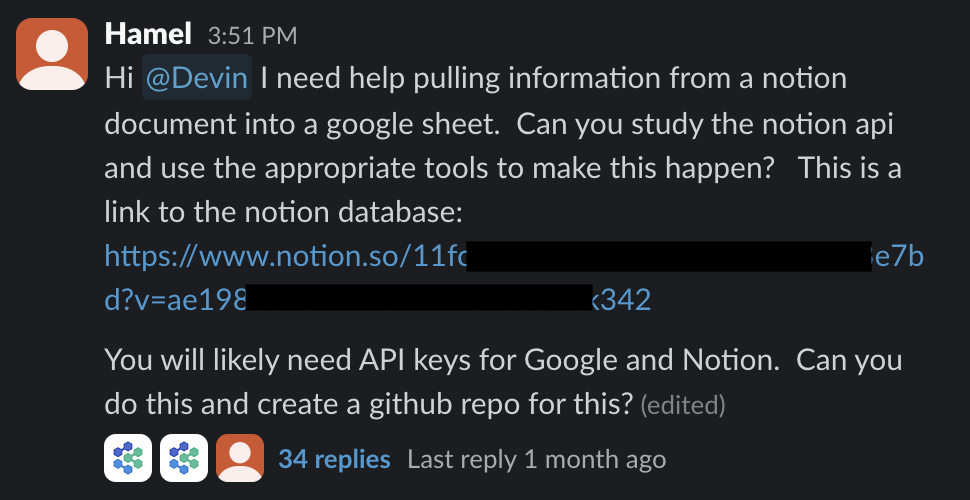
and even preview web applications it creates. Below is a screenshot of
one way to initiate a task for Devin to work on:

<figure>
<img src="images/devin_slack.png"
alt="One way to initiate a task with Devin - through Slack" />
<figcaption aria-hidden="true">One way to initiate a task with Devin -
through Slack</figcaption>
</figure>

The experience is designed to feel like chatting with a colleague. You
describe what you want, and Devin starts working. Through Slack, you can
watch it think through problems, ask for credentials when needed, and
share links to completed work. Behind the scenes, it’s running in a
Docker container, which gives it the isolation it needs to safely
experiment while protecting your systems. Devin also provides a web
interface, which also allows you to gain access to its envirnoment and
watch it work with IDEs, Web Browsers and more in real time. Here is a
screenshot of the web interface:

![](images/devin_internal.png)

## Early Wins

Our first task was straightforward but real: pull data from a Notion
database into Google Sheets. Devin tackled this with surprising
competence. It navigated to the Notion API documentation, understood
what it needed, and guided me through setting up the necessary
credentials in Google Cloud Console. Rather than just dumping API
instructions, it walked me through each menu and button click needed -
saving what would typically be tedious documentation sleuthing. The
whole process took about an hour (but only a few minutes of human
interaction). At the end, Devin shared a link to a perfectly formatted
Google Sheet containing our data.

The code it produced was a bit verbose, but it worked. This felt like a
glimpse into the future - an AI that could handle the “glue code” tasks
that consume so much developer time. Johno had similar success using
Devin to create a planet tracker for debunking claims about historical
positions of Jupiter and Saturn. What made this particularly impressive
was that he managed this entirely through his phone, with Devin handling
all the heavy lifting of setting up the environment and writing the
code.

## Scaling Up Our Testing

Building upon our early successes, we leaned into Devin’s asynchronous
capabilities. We imagined having Devin write documentation during our
meetings or debug issues while we focused on design work. But as we
scaled up our testing, cracks appeared. Tasks that seemed
straightforward often took days rather than hours, with Devin getting
stuck in technical dead-ends or producing overly complex, unusable
solutions.

Even more concerning was Devin’s tendency to press forward with tasks
that weren’t actually possible. When asked to deploy multiple
applications to a single [Railway](https://railway.com/) deployment
(something that Railway doesn’t support), instead of identifying this
limitation, Devin spent over a day attempting various approaches and
hallucinating features that didn’t exist.

The most frustrating aspect wasn’t the failures themselves - all tools
have limitations - but rather how much time we spent trying to salvage
these attempts.

## A Deeper Look at What Went Wrong

At this point in our journey, we were puzzled. We had seen Devin
competently handle API integrations and build functional applications,
yet it was struggling with tasks that seemed simpler. Was this just bad
luck? Were we using it wrong?

Over the course of a month, we systematically documented our attempts
across these categories:

1.  Creating new projects from scratch
2.  Performing research tasks
3.  Analyzing & Modifying existing projects

The results were sobering. Out of 20 tasks, we had 14 failures, 3
successes (including our 2 initial ones), and 3 inconclusive results.
Even more telling was that we couldn’t discern any pattern to predict
which tasks would work. Tasks that seemed similar to our early successes
would fail in unexpected ways. **We’ve provided more detail about these
tasks [in the appendix](#appendix-tasks-attempted-with-devin) below.**
Below is a summary of our experiences in each of these categories:

### 1. Creating New Projects From Scratch

This category should have been Devin’s sweet spot. After all, the
company’s demo video showed it autonomously completing an Upwork bounty,
and our own early successes suggested it could handle greenfield
development. The reality proved more complex.

Take our attempt to integrate with an LLM observability platform called
[Braintrust](https://braintrust.dev/). The task was clear: generate
synthetic data and upload it. Instead of a focused solution, Devin
produced what can only be described as code soup - layers of abstraction
that made simple operations needlessly complex. We ultimately abandoned
Devin’s attempt and used Cursor to build the integration step-by-step,
which proved far more efficient. Similarly, when asked to create an
integration between our AI notes taker and
[Spiral.computer](https://spiral.computer/), Devin generated what one
team member described as “spaghetti code that was way more confusing to
read through than if I’d written it from scratch.” Despite having access
to documentation for both systems, Devin seemed to overcomplicate every
aspect of the integration.

Perhaps most telling was our attempt at web scraping. We asked Devin to
follow Google Scholar links and grab the most recent 25 papers from an
author - a task that should be straightforward with tools like
[Playwright](https://playwright.dev/). This should have been
particularly achievable given Devin’s ability to browse the web and
write code. Instead, it became trapped in an endless cycle of trying to
parse HTML, unable to extract itself from its own confusion.

### 2. Research Tasks

If Devin struggled with concrete coding tasks, perhaps it would fare
better with research-oriented work? The results here were mixed at best.
While it could handle basic documentation lookups (as we saw in our
early Notion/Google Sheets integration), more complex research tasks
proved challenging.

When we asked Devin to research transcript summarization with accurate
timestamps - a specific technical challenge we were facing - it merely
regurgitated tangentially related information rather than engaging with
the core problem. Instead of exploring potential solutions or
identifying key technical challenges, it provided generic code examples
that didn’t address the fundamental issues. Even when Devin appeared to
be making progress, the results often weren’t what they seemed. For
instance, when asked to create a minimal [DaisyUI](https://daisyui.com/)
theme as an example, it produced what looked like a working solution.
However, upon closer inspection, we discovered the theme wasn’t actually
doing anything - the colors we were seeing were from the default theme,
not our customizations.

### 3. Analyzing and Modifying Existing Code

Perhaps Devin’s most concerning failures came when working with existing
codebases. These tasks require understanding context and maintaining
consistency with established patterns - skills that should be central to
an AI software engineer’s capabilities.

Our attempts to have Devin work with [nbdev](https://nbdev.fast.ai/)
projects were particularly revealing. When asked to migrate a Python
project to nbdev, Devin couldn’t grasp even basic nbdev setup, despite
us providing it access to comprehensive documentation. More puzzling was
its approach to notebook manipulation - instead of directly editing
notebooks, it created Python scripts to modify them, adding unnecessary
complexity to simple tasks. While it occasionally provided useful notes
or ideas, the actual code it produced was consistently problematic.

Security reviews showed similar issues. When we asked Devin to assess a
GitHub repository (under 700 lines of code) for security
vulnerabilities, it went overboard, flagging numerous false positives
and hallucinating issues that didn’t exist. This kind of analysis might
have been better handled by a single, focused LLM call rather than
Devin’s more complex approach.

The pattern continued with debugging tasks. When investigating why SSH
key forwarding wasn’t working in a setup script, Devin fixated on the
script itself, never considering that the problem might lie elsewhere.
This tunnel vision meant it couldn’t help us uncover the actual root
cause. Similarly, when asked to add conflict checking between user input
and database values, one team member spent several hours working through
Devin’s attempts before giving up and writing the feature themselves in
about 90 minutes.

## Reflecting As A Team

After a month of intensive testing, our team gathered to make sense of
our experiences. These quotes capture our feelings best:

> Tasks it can do are those that are so small and well-defined that I
> may as well do them myself, faster, my way. Larger tasks where I might
> see time savings I think it will likely fail at. So no real niche
> where I’ll want to use it. *- Johno Whitaker*

> I had initial excitement at how close it was because I felt I could
> tweak a few things. And then slowly got frustrated as I had to change
> more and more to end up at the point where I would have been better of
> starting from scratch and going step by step. *- Isaac Flath*

> Devin struggled to use internal tooling that is critical at AnswerAI
> which, in addition to other issues, made it difficult to use. This is
> despite providing Devin with copious amounts of documentation and
> examples. I haven’t found this to be an issue with tools like Cursor,
> where there is more opportunity to nudge things in the right direction
> more incrementally. *- Hamel Husain*

In contrast to Devin, we found workflows where developers drive more
(like Cursor) avoid most issues we faced with Devin.

## Conclusion

Working with Devin showed what autonomous AI development aspires to be.
The UX is polished - chatting through Slack, watching it work
asynchronously, seeing it set up environments and handle dependencies.
When it worked, it was impressive.

**But that’s the problem - it rarely worked.** Out of 20 tasks we
attempted, we saw 14 failures, 3 inconclusive results, and just 3
successes. More concerning was our inability to predict which tasks
would succeed. Even tasks similar to our early wins would fail in
complex, time-consuming ways. The autonomous nature that seemed
promising became a liability - Devin would spend days pursuing
impossible solutions rather than recognizing fundamental blockers.

This reflects a pattern we’ve observed repeatedly in AI tooling. Social
media excitement and company valuations have minimal relationship to
real-world utility. We’ve found the most reliable signal comes from
detailed stories of users shipping products and services. For now, we’re
sticking with tools that let us drive the development process while
providing AI assistance along the way.

## Appendix: Tasks Attempted With Devin

Below is a table of projects we gave Devin, categorized by the themes
of: (1) Creating a new project, (2) research, (3) analyze an existing
code base and (4) modifying a code base.

### 1. Create A New Project

<table>
<colgroup>
<col style="width: 27%" />
<col style="width: 17%" />
<col style="width: 27%" />
</colgroup>
<thead>
<tr>
<th>Project Name</th>
<th>Status</th>
<th>Description</th>
<th>Reflections</th>
</tr>
</thead>
<tbody>
<tr>
<td>Planet Tracker</td>
<td><span style="color: #28a745">Success</span></td>
<td>I wanted to debunk some claims about historical positions of Jupiter
and Saturn</td>
<td>Devin nailed it. I actually talked to Devin from my phone via slack
and it made it happen.</td>
</tr>
<tr>
<td>Migrating data from Notion Into Google Sheets</td>
<td><span style="color: #28a745">Success</span></td>
<td>I told Devin to programmatically pull info from a Notion document
into a Google Sheet. This was my very first project that I executed with
Devin and it pulled it off nicely. Devin read notion and Google API docs
by itself. Devin also navigated me to the Google Cloud console and
provided me with instructions on all the different menus to click
through which would have taken me quite a bit of time on my own! At the
end, I was given a reasonable Python script that executed the task.</td>
<td>This was my very first interaction with Devin and it executed
exactly what I wanted it to do, which was a brand new experience for me.
I was quite excited about Devin at this point.</td>
</tr>
<tr>
<td>Multi-app deploys on Railway</td>
<td><span style="color: #ffc107">Inconclusive</span></td>
<td>I asked Devin to deploy multiple applications to a single railway
deployment, so that I could have different apps sharing the same local
db for testing.</td>
<td>It turns out that this task was ill-defined because it’s not
actually possible to do this, if I understand correctly. However, Devin
marched forward and tried to do this and hallucinated some things about
how to interact with railway.</td>
</tr>
<tr>
<td>Generate synthetic data and upload it to Braintrust</td>
<td><span style="color: #dc3545">Failure</span></td>
<td>I asked Devin to create synthetic data for a LLM observability
platform called Braintrust that I wanted to test.</td>
<td>Devin created overly complex code that was hard to understand, and
got stuck trying to fix errors. We ended up using Cursor to do this step
by step in an iterative fashion.</td>
</tr>
<tr>
<td>Create an integration between two applications</td>
<td><span style="color: #dc3545">Failure</span></td>
<td>I asked Devin to create an integration between Circleback, my AI
notes taker, and Spiral.computer with pointers to the documentation of
each.</td>
<td>I got really horrible spaghetti code that was way more confusing to
read through than me trying to just write it from scratch. So I decided
to not invest any more time in using Devin for this particular
task.</td>
</tr>
<tr>
<td>Web scraping Papers By Following Google Scholar Links</td>
<td><span style="color: #dc3545">Failure</span></td>
<td>I asked Devin to grab the most recent 25 papers from an author on
Google Scholar programmatically using playwright, and if it encountered
a paywall it was ok to skip that particular document.</td>
<td>Devin went into a rabbit hole of trying to parse HTML that it seems
like it couldn’t get out of. It got stuck and went to sleep.</td>
</tr>
<tr>
<td>Create minimal HTMX bulk upload example app</td>
<td><span style="color: #dc3545">Failure</span></td>
<td>I asked Devin to read the HTMX documentation page for bulk edit
example and with that and fake server code, create a minimal FastHTML
version of the example for the FastHTML Gallery.</td>
<td>The example did not work and was not minimal. Devin used objects
from the request object that didn’t exist and added many unnecessary
things, like toasts (which also didn’t work), and inline css
styling.</td>
</tr>
<tr>
<td>Create a DaisyUI Themes to match FrankenUI Theming</td>
<td><span style="color: #dc3545">Failure</span></td>
<td>I asked Devin to create DaisyUI and highlight.js theming so that
they match the frankenui themes and can be used in the same app
seamlessly</td>
<td>Devin mapped daisyUI pre-existing themes to frankenui themes, but
did they did not match well in many cases. It was also a ton of code
changes that I didn’t understand and I ended up not using any of it
because I was too confused to know what to do with it.</td>
</tr>
</tbody>
</table>

### 2. Perform Research

<table>
<colgroup>
<col style="width: 27%" />
<col style="width: 17%" />
<col style="width: 27%" />
</colgroup>
<thead>
<tr>
<th>Project Name</th>
<th>Status</th>
<th>Description</th>
<th>Reflections</th>
</tr>
</thead>
<tbody>
<tr>
<td>Research How to make a discord bot</td>
<td><span style="color: #28a745">Success</span></td>
<td>I asked Devin to perform research on how I could use Python to build
a Discord bot that summarizes each day’s messages and sends an email. I
also told it to use Claudette if possible to do so. Finally, I told it
to write its findings in notebooks with small code snippets I could use
to test.</td>
<td>Devin produced research notes in the form of a markdown file as an
intermediate step to creating the notebook, which I did not ask it for.
However, it was quite useful to see a step-by-step plan on how an
implementation might come together. The code that it provided me in the
notebook was not 100% correct, but it was useful as pseudocode to give
me an idea of how I might glue this together. Given that this was more
of a research project and I wanted just to know the general idea, I
would call this a success.</td>
</tr>
<tr>
<td>Research on Transcript Summarization With Accurate Timestamps</td>
<td><span style="color: #dc3545">Failure</span></td>
<td>One issue that I face with summarizing transcripts is that I would
love to have accurate timestamps that go with notes, so that I could use
it for YouTube chapter summaries or similar. Concretely, it is not a
problem to get accurate time-stamps from a transcript, But it’s
difficult to associate timestamps with summaries because the timestamps
often get bungled. So this is kind of an AI engineering research
task.</td>
<td>Devin regurgitated related things to my problem but it did not
tackle it did not do a good job of performing research or trying to
tackle the problem I was trying to solve, and gave me pointers to code
and examples that were not helpful.</td>
</tr>
<tr>
<td>Create a minimal DaisyUI theme as an example</td>
<td><span style="color: #dc3545">Failure</span></td>
<td>I asked Devin to create a minimal DaisyUI theme as an example. My
goal was to get a starting point to start from since asking it to do it
in a more complete way was unsuccessful.</td>
<td>Devin ignored the request to make it as a FastHTML app, and it took
some back and forth to get it to go down that path. Eventually, it
created an app that appeared to work with different button types. While
it gave a link that looked good, once I tried modifying the theme, is
became clear the theme was doing nothing. The other colors in the app
were from the default theme. This is not a helpful starting point.</td>
</tr>
</tbody>
</table>

### 3. Analyze Existing Code

<table>
<colgroup>
<col style="width: 27%" />
<col style="width: 17%" />
<col style="width: 27%" />
</colgroup>
<thead>
<tr>
<th>Project Name</th>
<th>Status</th>
<th>Description</th>
<th>Reflections</th>
</tr>
</thead>
<tbody>
<tr>
<td>Performing a security review of a code base</td>
<td><span style="color: #ffc107">Inconclusive</span></td>
<td>For this task, I pointed Devin at a GitHub repository and told it to
assess it for security vulnerabilities. The codebase is under 700 lines
of code. I told Devin to write its notes in a markdown file with sample
code where necessary.</td>
<td>Devin did identify some security vulnerabilities but was extremely
overzealous and hallucinated some issues that were not there. Perhaps
this was not the ideal task for Devin as this is something that would be
just as good in a single call to my favorite LLM.</td>
</tr>
<tr>
<td>Review blog posts and make a pull request with improvements</td>
<td><span style="color: #dc3545">Failure</span></td>
<td>I asked Devin to review a blog post and suggest changes with a pull
request. Ultimately, Devin failed because it could not figure out how
the static site generator that I was using, Quarto, worked.</td>
<td>I think that this task would have been successful inside something
like Cursor. It seemed like Devin did not do a good job of learning from
the project structure and existing files, so it messed up things like
front matter and other conventions necessary to edit the blog post
correctly.</td>
</tr>
<tr>
<td>Review An Application and Identify Potential Areas of
Improvement</td>
<td><span style="color: #dc3545">Failure</span></td>
<td>I asked Devin to view the timekeeping app I had mentioned earlier
and provided an open-ended task of asking it to suggest any
improvements.</td>
<td>The suggestions that it provided did not make any sense.</td>
</tr>
<tr>
<td>Debug why ssh key forwarding is not working in a setup script</td>
<td><span style="color: #ffc107">Inconclusive</span></td>
<td>I asked Devin to figure out why ssh key forwarding was not working
on a server when I used a script to set it up.</td>
<td>The issue ended up being unrelated to the script, which I thought
was the problem, but Devin never suggested or implied that maybe the
problem was somewhere else. It was not helpful because it did not help
me uncover the root cause.</td>
</tr>
</tbody>
</table>

### 4. Modify An Existing Project

<table>
<colgroup>
<col style="width: 27%" />
<col style="width: 17%" />
<col style="width: 27%" />
</colgroup>
<thead>
<tr>
<th>Project Name</th>
<th>Status</th>
<th>Description</th>
<th>Reflections</th>
</tr>
</thead>
<tbody>
<tr>
<td>Making changes to a nbdev project</td>
<td><span style="color: #dc3545">Failure</span></td>
<td>I had a simple application for time tracking built with FastHTML and
nbdev that I wanted to integrate with apple shortcuts via an API
route.</td>
<td>Devin could not figure out how to operate successfully in this
environment, even though it got impressively far. One curiosity that I
noticed is that Devin created Python scripts to edit notebooks rather
than trying to edit the notebook itself. However, Devin gave me some
useful notes there and ideas that I hadn’t considered. However, the code
that it tried to write did not make sense. Eventually, I ended up using
a template from someone else and not going with any of Devin’s
suggestions.</td>
</tr>
<tr>
<td>Migration of python Project To nbdev</td>
<td><span style="color: #dc3545">Failure</span></td>
<td>I asked Devin to migrate a project to nbdev [prompt details omitted
for brevity]</td>
<td>It got horribly stuck and could not figure out basic nbdev setup. It
seems like it didn’t do a good job of reading the nbdev docs.</td>
</tr>
<tr>
<td>Integrate Styling Package Into FastHTML</td>
<td><span style="color: #dc3545">Failure</span></td>
<td>I asked Devin to integrate MonsterUI into one of my
applications.</td>
<td>Devin could not figure out how to work with a nbdev repo.</td>
</tr>
<tr>
<td>Add feature to check for conflicts between user input and
database</td>
<td><span style="color: #dc3545">Failure</span></td>
<td>I asked Devin to add a feature to an app to compare user input
values to values from a database based on prior runs and give a UI if
they don’t match.</td>
<td>I spent several hours slowly working through getting it working
properly before I gave up. I wrote the feature myself in about 90
minutes.</td>
</tr>
<tr>
<td>Generate LLMs context file with the contents of every fasthtml
gallery example</td>
<td><span style="color: #dc3545">Failure</span></td>
<td>I asked Devin to create llms text files for the fasthtml
gallery</td>
<td>I was excited to see it created a separate markdown file for each
example and then tried to roll them up in the llms context files
initially. I had not thought about doing that and things seemed all
there at first. When I pulled down and started digging in I started
finding things I did not like: The format of the llms wasn’t correct.
Even though I gave it infomration to use XML tags to seperate examples,
it didn’t. It added and pinned a specific version of the markdown
package as a dependency and used that, instead of using the markdown2
package with is already used and was already a dependency. It did a
bunch of pytest stuff and added a dep, even though the project doesn’t
use pytest.</td>
</tr>
</tbody>
</table>

[1] This demo was descisively debunked by this
[video](https://www.youtube.com/watch?v=tNmgmwEtoWE)
