 HTMX was previously known as [Intercooler](https://intercoolerjs.org/).
It is now over 10 years old—so it’s a mature technology.
HTMX/Intercooler is responsible for the idea that we can build on top of
the fundamentals of the web, without sacrificing the ability to create
modern, interactive web applications. Without it, FastHTML would not
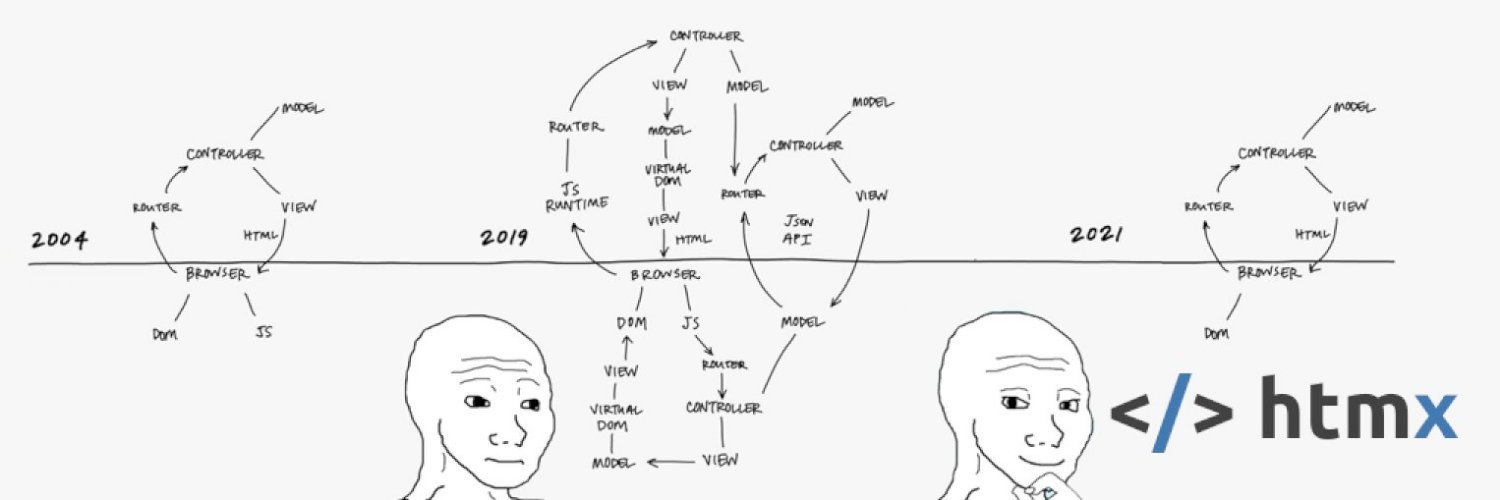
exist. HTMX is famous for its
[memes](https://v1.htmx.org/essays/#memes), including the image above,
which highlights how HTMX’s approach returns us to the simplicity of the
early days of the web (although perhaps now we should update that meme
to FastHTML 2024, where we would have just 3 parts: browser, DOM, and a
python file!)
To learn more about how HTMX works and how to use it, see the *HTMX
technology*. To understand the benefits of using HTMX in practice, watch
[this talk](https://www.youtube.com/watch?v=3GObi93tjZI), which goes
through a real case study of using HTMX to replace React in a complex
large application. It shows how HTMX allowed the amount of code to be
drastically reduced, the speed of the site got faster, and they were
able to simplify their team structure by removing the need for frontend
specialists.
### HTTP
All web page requests are made by your browser, and returned by the web
server, using *HTTP*. Many web programming systems attempt to hide this
from the developer, but FastHTML (and the underlying technologies
Uvicorn, Starlette, and HTMX) does not. By surfacing this, it means you
are working directly with the foundations of the web, not through
frequently-changing leaky abstractions. HTTP is, at its heart, a simple
text protocol that underlies all web communication. It starts with a
request, e.g:
GET / HTTP/1.1
Host: www.example.com
User-Agent: Mozilla/5.0
Accept-Language: en-GB,en;q=0.5
Accept-Encoding: gzip, deflate, br
Connection: keep-alive
The first line shows it is a *GET* request for the root URL (`/`). The
next lines are *headers*, which provide additional information about the
request.
The server then responds with a status code (here *200*, which
represents success), headers, and the content, e.g:
HTTP/1.1 200 OK
Date: Wed, 08 Jan 2024 23:1:05 GMT
Content-Type: text/html; charset=UTF-8
Content-Length: 5
Server: Apache/2.4.51 (Unix)
Connection: close
hello
When you understand that all web applications communicate like this, and
your programming framework lets you easily interact with this, you will
have no limitations on what you can build. Having said that, working
directly with HTTP’s text protocol is not easy, which is why the
higher-level ASGI protocol exists. It makes all of HTTP available to the
Python programmer in a simpler form. In addition, HTMX allows the
browser to more fully utilise HTTP.
### HTML/CSS/JS
In the previous section, the server responded with the body “`hello`”.
But in practice, web server responses today generally are either HTML or
JSON. With FastHTML (as we’ll see later), our responses are nearly
always HTML. Here’s an example of a basic HTML page with a header and a
body containing a paragraph (`
HTMX was previously known as [Intercooler](https://intercoolerjs.org/).
It is now over 10 years old—so it’s a mature technology.
HTMX/Intercooler is responsible for the idea that we can build on top of
the fundamentals of the web, without sacrificing the ability to create
modern, interactive web applications. Without it, FastHTML would not
exist. HTMX is famous for its
[memes](https://v1.htmx.org/essays/#memes), including the image above,
which highlights how HTMX’s approach returns us to the simplicity of the
early days of the web (although perhaps now we should update that meme
to FastHTML 2024, where we would have just 3 parts: browser, DOM, and a
python file!)
To learn more about how HTMX works and how to use it, see the *HTMX
technology*. To understand the benefits of using HTMX in practice, watch
[this talk](https://www.youtube.com/watch?v=3GObi93tjZI), which goes
through a real case study of using HTMX to replace React in a complex
large application. It shows how HTMX allowed the amount of code to be
drastically reduced, the speed of the site got faster, and they were
able to simplify their team structure by removing the need for frontend
specialists.
### HTTP
All web page requests are made by your browser, and returned by the web
server, using *HTTP*. Many web programming systems attempt to hide this
from the developer, but FastHTML (and the underlying technologies
Uvicorn, Starlette, and HTMX) does not. By surfacing this, it means you
are working directly with the foundations of the web, not through
frequently-changing leaky abstractions. HTTP is, at its heart, a simple
text protocol that underlies all web communication. It starts with a
request, e.g:
GET / HTTP/1.1
Host: www.example.com
User-Agent: Mozilla/5.0
Accept-Language: en-GB,en;q=0.5
Accept-Encoding: gzip, deflate, br
Connection: keep-alive
The first line shows it is a *GET* request for the root URL (`/`). The
next lines are *headers*, which provide additional information about the
request.
The server then responds with a status code (here *200*, which
represents success), headers, and the content, e.g:
HTTP/1.1 200 OK
Date: Wed, 08 Jan 2024 23:1:05 GMT
Content-Type: text/html; charset=UTF-8
Content-Length: 5
Server: Apache/2.4.51 (Unix)
Connection: close
hello
When you understand that all web applications communicate like this, and
your programming framework lets you easily interact with this, you will
have no limitations on what you can build. Having said that, working
directly with HTTP’s text protocol is not easy, which is why the
higher-level ASGI protocol exists. It makes all of HTTP available to the
Python programmer in a simpler form. In addition, HTMX allows the
browser to more fully utilise HTTP.
### HTML/CSS/JS
In the previous section, the server responded with the body “`hello`”.
But in practice, web server responses today generally are either HTML or
JSON. With FastHTML (as we’ll see later), our responses are nearly
always HTML. Here’s an example of a basic HTML page with a header and a
body containing a paragraph (`` tag).
Hello World!
HTML creates structure, and the browser converts the HTML internally into a Document Object Model (DOM) element tree. To add styling to the browser’s representation of a document, we add styles using *CSS*. One approach is to manually define styles in a CSS file—for instance [here’s the stylesheet](https://github.com/AnswerDotAI/fh-bootstrap/blob/main/assets/fh-bootstrap.css#L1) we’re using for the site you’re reading now, with the CSS rule which gives the above HTML block a light grey border and background. Most styles in most FastHTML applications won’t be manually defined, but instead will come from a CSS framework like Bootstrap, DaisyUI, or Shoelace. FastHTML makes these easily available as FT components. Although most of the logic of your application will generally be written in Python and made available over HTTP using FastHTML, you might well want some self-contained UI updates to happen directly in the browser. For this, you can write JavaScript and add it to the web page using FastHTML. This is not often strictly required, but can make some parts of your app faster, more concise, or add some convenient functionality from the browser’s DOM API. For instance, we often add a “Copy” button with sample code in our apps, which requires using the DOM API, and therefore requires adding a little JavaScript. JavaScript was originally designed for this purpose, so it’s a particularly good fit for adding client-side behaviours to applications. To learn how to add JS libraries to FastHTML, it can help to look at examples. FastHTML includes modules for a number of popular JS libraries, such as [Marked.js](https://marked.js.org/). To see how this is implemented, have a look at the [seven lines of source code](https://github.com/AnswerDotAI/fasthtml/blob/main/fasthtml/js.py#L7) for `MarkdownJS` in Python. ## FastHTML’s tech stack ### Python Many of the largest software systems in the world are built using Python, such as much of the code for YouTube, Instagram, Dropbox, and many others. In 2019, Dropbox announced that python was their “most widely used language both for backend services and the desktop client app”, with 4 million lines of code. If you’re already a Python programmer, then you’ll know how easy it is to turn your ideas into code using this language. As well as being used for large-scale systems, Python is also popular for the day-to-day work of scientists, engineers, data analysts, and so forth. One particular challenge for Python programmers has been that to create a modern web application, they have had to also learn JavaScript, along with a framework like React, Angular, or Vue. Even after learning all this, they still have to deal with the complexity of writing, debugging, and maintaining a multi-language system with complex interactions between the two languages and across the client-server boundary. With FastHTML, you’ll often find you never have to write any JavaScript at all. Not only does development and debugging become much easier, but many features suddenly become easier to implement. For instance, when we wanted to add caching to speed up our [home page](https://fastht.ml), we simply added a standard decorator to the function that creates it. No need for special infrastructure, because the implementation is all in one place. ASGI makes this particularly powerful—it can handle caching, sessions, authentication, host-based redirects, sub-routing, and more, all in one place. All of this is directly accessible from FastHTML. ### HTMX Nowadays most web applications are built using backend systems that return a combination of JSON and HTML data over HTTP. Javascript, normally using frameworks such as React, Angular, or Vue, is used to combine the JSON and HTML together for display in the browser. This is an *“API based”* approach to web development. An alternative “hypermedia-based” approach, used by [HTMX](https://htmx.org/), simplifies things greatly by just returning HTML. FastHTML is designed to create hypermedia applications. Nearly all of the complexity of client-server programming vanishes when using this approach. When going to a page directly, the server will respond with a standard HTML web page: ``` htmlHello World!
``` This can be generated using this FastHTML code: ``` python @rt('/') def get(): return Div(P('Hello World!'), hx_get="/change") ``` When clicking on this link, the server will respond with an “*HTML partial*”—that is, just a snippet of HTML which will be inserted into the existing page: ``` htmlNice to be here!
``` In this case, the returned element will replace the original `P` element (since that’s the default behavior of HTMX). Our code to create this `/change` handler is: ``` python @rt('/change') def get(): return P('Nice to be here!') ``` As we discuss in the *HTMX foundations* section, HTMX removes four critical constraints of HTML. It allows any event on any DOM element to call any HTTP method on any path and place the response anywhere in the DOM. If you haven’t written a hypermedia-based application before, then we strongly recommend reading the [Hypermedia Systems book](https://hypermedia.systems/). It explains how to build hypermedia applications using HTMX; the techniques you learn there will be directly applicable to FastHTML. ### Uvicorn [Uvicorn](https://www.uvicorn.org/) is, according to its website, “an ASGI web server”. What does that even mean? As we’ve discussed, ASGI is a Python API that converts HTTP requests and responses into Python function calls. Uvicorn is a web server which a web browser can talk to, and it in turn talks to an ASGI application, returning its results back to the browser. Most of the time you’ll run your FastHTML application by simply adding one line of code to the end of your `main.py` file: `serve()`. When you do, a message will be printed letting you know that you now have a web server running on your computer, and if you click on the provided link you’ll see your application running. If you look at the source code for `main.py`, you’ll see that the line of code that actually runs the server is calling Uvicorn to do the work: ``` python uvicorn.run(f"{fname}:{app}", host=host, port=port, reload=reload) ``` When you deploy your application, you’ll often use a service provider like Railway or Vercel. The one-click deployment we provide simply calls `python main.py` for you, and the provider is responsible for connecting the port that Uvicorn is running on to a public IP address. You can also run your application on a server such as a VPS, and either set the `PORT` environment variable to `80` to make it available directly, or add a frontend server like nginx or caddy to forward requests to the port that Uvicorn is running on. ### Starlette Because ASGI is such a simple API (it’s literally a single Python function that takes three arguments), counter-intuively that actually makes it quite complex to use. It doesn’t do that much for you, so there’s quite a lot of boilerplate to write in order to create an ASGI application directly to use with Uvicorn. [Starlette](https://www.starlette.io/) makes it much easier to create ASGI applications. It removes a lot of the boilerplate by providing a few simple abstractions, such as `Request`, `Response`, and `Route`. Reading the source code to Starlette is very informative, because you realise how little code is actually involved; it’s just converting the minimal ASGI API into a more convenient set of classes and functions. Starlette isn’t at all opinionated about how you create your web application. Therefore, other libraries have stepped in to provide more specific functionality. For instance, [FastAPI](https://fastapi.tiangolo.com/) provides a framework built on top of Starlette that adds a lot of functionality for creating JSON APIs. When Jeremy Howard decided he wanted to create a library to make it easier to build hypermedia applications, he used FastAPI as a role model. In fact, he went through each page of the FastAPI tutorial and attempted to replicate as much as he could, but for hypermedia applications instead of JSON APIs. The creator of FastAPI, Sebastián Ramírez, was extremely generous with his time and advice to Jeremy and helped to explain the thinking behind FastAPI’s design. The main `FastHTML` class is actually implemented as a subclass of Starlette’s `Application` class. That means that you can use any middleware, routing, and other features that are compatible with Starlette. (However, you’ll often find that FastHTML provides a more convenient way to do things.) Although FastAPI and FastHTML are both built on top of Starlette, and FastHTML is inspired by FastAPI, there are plenty of differences, since they have different purposes. So if you’ve used FastAPI before, don’t assume that everything will be identical! ### SQLite Out of the box, FastHTML provides support for SQLite, via the [Fastlite](https://answerdotai.github.io/fastlite/) library. SQLite is built in to Python, so you don’t need to install anything extra. Because it uses a file to store and access the database directly from Python, it’s extremely fast to access, and it’s very easy to use. Fastlite provides an extremely simple API for database access, and lets you use standard Python builtin functionality such as dataclasses and dicts to read and write data. Older versions of SQLite were not scalable, because they didn’t support concurrent reads with writes. That limitation however was resolved some years ago through the addition of [write-ahead logging](https://www.sqlite.org/wal.html) (WAL), which FastHTML uses by default. With WAL and a modern multi-core computer and fast SSD, SQLite can support large and popular websites. Systems such as [Litestream](https://litestream.io/) can be used to replicate the database to a remote server. Instead of Fastlite and SQLite, you can also use SQLModel, SQLAlchemy, Redis, or any other database server or data storage system. We (and the FastHTML community) will be continually adding more data storage options to FastHTML. ## Python HTML components FastHTML embeds HTML generation inside Python code. The idea of embedding an HTML generator inside a programming language is not new. It is a particularly popular approach in functional languages, and includes libraries like: Elm-html (Elm), hiccl (Common Lisp), hiccup (Clojure), Falco.Markup (F#), Lucid (Haskell), and dream-html (OCaml). But the idea has now gone far beyond the functional programming world— JSX, an embedded HTML generator for React, is one of the most popular approaches for creating web apps today. ### Why Most Python programmers are probably more familiar with template-based approaches, such as Jinja2 or Mako. Templates were originally created for web development in the 1990s, back when web design required complex browser-specific HTML. By using templates, designers were able to work in a familiar language, and programmers could “fill in the blanks” with the data they needed. Today this is not needed, since we can create simple semantic HTML, and use CSS to style it. Templates have a number of disadvantages, for instance: - They require a separate language to write the templates, which is an additional learning curve - Template languages are generally less concise and powerful than Python - Refactoring a template into sub-components is harder than refactoring Python code - Templates generally require separate files - Templates generally do not support the Python debugger. By using Python as the HTML-generation language, we can avoid these disadvantages. More importantly, we can create a rich ecosystem of tools and frameworks available as pip-installable Python modules, which can be used to build web applications. It so happens that Python’s positional and keyword arguments are a perfect 1:1 mapping to the children and attributes of HTML elements, so we take advantage of to create functional components in Python. ### How FastHTML’s underlying component data structure is called `FT` (“FastTag”). To learn how this works in detail, see the [Explaining FT Components](https://docs.fastht.ml/explains/explaining_xt_components.html) page. `FT` objects can be created with functions with the Capitalized name of each HTML tag, such as `Div`, `P`, and `Img`. The functions generally take positional and keyword arguments: - Positional arguments represent a list of children, which can be strings (in which case they are text nodes), FT child components, or other Python objects (which are stringified). - Keyword arguments represent a dictionary of attributes, which can be used to set the properties of the HTML tag - Keyword arguments starting with `hx_` are used for HTMX attributes. Some functions, such as `File`, have special syntax for their arguments. For instance, `File` takes a single filename argument, and creates a DOM subtree representing the contents of the file. Any FastHTML handler can return a tree of `FT` components, or a tuple of FT component trees, which will be rendered as HTML partials and sent to the client for processing by HTMX. If a user goes directly to a URL rather than using HTMX, the server will automatically return a full HTML page with the partials embedded in the body. Much of the time you’ll probably be using pre-written FastHTML components that package up HTML, CSS, and JS. Often, these will in turn hand off much of the work to some general web framework; for instance the site you’re reading now uses Bootstrap (and the `fh-bootstrap` FastHTML wrapper). At first, moving from HTML to FT components, can seem odd, but it soon becomes natural – as Audrey Roy Greenfeld, a hugely experienced Python web programmer author, and educator, told us: > “*In my head I had resistance and initial scepticism to converting all > my HTML to FT. When I realised that working with the tags in Python is > like the elegance of working in the frequency domain after Fourier > transform vs. working with time series data in the time domain, I > finally gave in, let go, started enjoying the FT tags. The first few > times I thought the approach of conversion and then copy pasting was > crazy. It was only when I started to understand how to organise the > tags into components that it suddenly felt elegant and templates felt > crazy.*” One good approach to creating components is to find things you like on the web and convert them to FastHTML. There’s a simple trick to doing this: 1. Right-click on the part of a web page that you want to use in your app, and choose ‘Inspect’ 2. In the elements window that pops up, right-click on the element you want, choose ‘Copy’, and then ‘Outer HTML’ 3. Now you’ve got HTML in your clipboard, you can automatically convert it to FastHTML: go to [h2f.answer.ai](https://h2x.answer.ai/), paste the HTML into the text area at the top, then the FastHTML code will appear at the bottom. Click the Copy icon at the top right of that code and then paste it into your Python app. BTW, the h2f app mentioned above is written in around a dozen lines of code! You can see the [source code here](https://github.com/AnswerDotAI/fasthtml-example/blob/main/h2f/main.py). ### The future We want your help! FastHTML is very new, so the ecosystem at this stage is still small. We hope to see FastHTML Python versions of style libraries like Bootstrap, DaisyUI, and Shoelace, as well as versions of all the most popular JavaScript libraries. If you are a Python developer, we would love your help in creating these libraries! If you do create something for FastHTML users, let us know, so we can link to your work (or if you think it would be a useful part of the FastHTML library itself, or one of our extension libraries, feel free to send us a pull request). We would also like to see Python modules that hook into FastHTML’s and Starlette’s extensibility points, such as for authentication, database access, deployment, multi-host support, and so forth. Thanks to Python’s flexibility and the power of ASGI, it should be possible for a single FastHTML server to replace a whole stack of separate web servers, proxies, and other components.